Table of Contents
Overview
A credit card pre-authorization is much like any other charge to a credit card, except instead of actually debiting funds from the cardholder you just put a temporary “hold” on the funds that lasts for 5 days usually. At a technical level, the actual duration of the hold depends on the merchant classification code (MCC code). Some type of merchants may qualify for a longer hold than others, but in general if you are going to “capture” a pre-authorized payment you should do it before the 5th day to make certain the funds will be available. If you wait too long and the pre-auth has expired the post-authoriztion (capture) will be declined and you'll have to contact the cardholder to run the payment over again.
Once a credit card has been pre-authorized the cardholder cannot go and spend this money anywhere else. However, at the same time the charge doesn't actually show up on their credit card statement. (Although, if they call their card issuing bank the card issuer will confirm that a pre-authorization is holding funds on the cardholders account).
The merchant must go in and “capture” the funds within the expiration period. If they do not, the pre-authorization will expire and the funds will be released by the card issuing bank back to the cardholder.
The main benefit of credit card pre-authorizations is to avoid chargebacks. A cardholder cannot dispute a transaction or issue a chargeback if the funds have not been captured. This means that online merchants can process transactions without having to worry about fraudsters causing chargebacks if using stolen cards
Here's a good WIKI article that discusses pre-authorizations in detail.
Pre-Authorize Payments
To pre-authorize a payment, follow these steps.
- Open the Quick Payment interface on an order. Pre-authorizations cannot be processed through the Multi-Pay interface.
- Enter the pre-authorize amount in the Amount to Pay field.
- Click the Pre-Authorize Card Only checkbox.
- Only your processed credit card payment types will be active. Select (or enter) the card to post the pre-authorization on.


There are 3 ways to see which orders have pre-authorizations:
- On the order's Payments tab

- In the Order Explorer

- On the Credit Card Authorization Report


Capture Pre-Authorized Funds
To process a pre-authorization (also know as “Capture”):
- Open the order with the pre-authorization
- Open the Quick Payment interface
- The Pre-Authorization should be the very first Payment Type
- Select the Pre-Authorization


Releasing Pre-Authorized Funds
Pre-authorizations can be removed (also known as “Released”) three ways:
- Capturing the pre-authorization (processing the credit card)
- Voiding or closing the order a pre-authorization was linked to
- Releasing the pre-authorization.
- From the Order Explorer
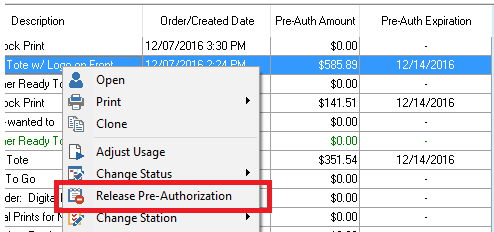
- From the Order's Payment tab

Next Step: Proceed to the how_to_process_a_payment_for_1_order wiki
Source
Contributor: Cyrious Software
Date: 12/09/2016
Version: Control 06.00