Introduction
Previously in Control, there was an asymmetry with date management between Orders and Line Items.
| Order Level | Line Item Level | ||||
| Due Date | ✓ | ✓ | |||
| Due Time | ✓ | ✘ | |||
| Proof Due Date | ✓ | ✘ | |||
| Proof Due Time | ✓ | ✘ |
This feature includes adding these three missing pieces to Control at the line item level for Orders and Service Tickets.
Summary of changes:
- Since the line item's database field for Due Date is already a Date/Time field, it did not require any changes to the database. However, the time piece of the Due Date was not exposed.
- A new field for the line item's Proof Date was added, along with a Proof Date OV field indicating if the line item proof date is overridden or not.
- Changes to the Line Item's advanced tab to allow the user to set these new values.
- Right-click options in the Line Item Explorer and Service Ticket Explorer have been added to enable quick changing of the Due Date and Proof Date.
- Adjustments to the columns in Line Item Explorer and Service Ticket Explorer for these changes have been made.
- Change in Production Terminal to show the time on the due date.
- The CFL Fields DueDate, DueDateOV, ProofDate, and ProofDateOV were published on both the line item and order so they are accessible via CFL.
Order Entry Screen Changes
To support the additional data fields, the advanced tab on the Order Entry screen was modified.
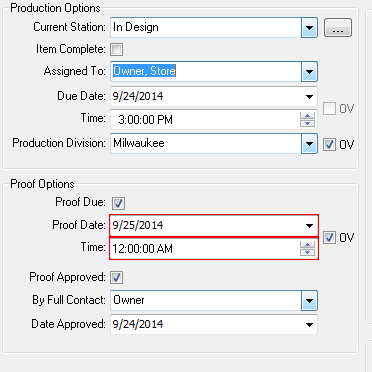
The following changes were made on the advanced tab:
- Added the Due Date Time field.
- Renamed the Proof Approval section as simply Proof Options:
- Added a checkbox for Proof Due.
- Added the fields for Proof Date, Time, and OV.
- The Due Date fields and the Proof Options section are all hidden if the options to show these fields on orders is not enabled.
Also, on the Line Item Tree Grid, in Order Entry (on the items tab):
- Included the time on the Due Date column.
- Added a column for Proof Date.

Line Item Right Click Changes
To make changing the line item due date/time and proof date/time easier, we wanted to add right-click options to the line item. The actions appear directly on the first level of the pop-up (provided the options to use them is enabled) so the user does not need to drill down to find them.
These options are enabled on the line items and Service Ticket explorers as well as in an Order/Estimate.
The corresponding popups look as follows:

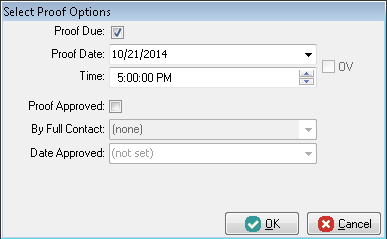
If the order is not in edit mode, a quick-edit on the line item will be done (one that does not require recomputing prices, costs, or variables).
If enabled, the standard options against setting Due Dates before today, or Proof Dates before Due Dates should be enforced.
Service tickets do not have proof dates, so service ticket items do not have a change proof date action.
Line Item/Service Ticket Explorer Screen Changes
A few changes were necessary to the line item and service ticket explorers.
- In the Due Date Column, we now show the Time.
- Added a Proof Date Column to column chooser of line item explorer. Used the same date/time format as with the Due Date.
Line Item Proof Date Logic
Previously, the default line item due date is determined from the Shipments due date and Order due date. The logic for Due Date on the line item remains the same, although the time needs to be pulled as well as the date.
For the line item proof date/time, the default value if not overridden will pull from the Order's proof date/time.