Table of Contents
{$page}
Overview
Previously, the parts grid has the ability to show the actual usage column, but that column was made non-editable with the introduction of Part Usage cards in Control 4.0. Part Usage cards are the mechanism for adding actual usage and costs to an job. Unlike the computed or estimated costs, actual costs in part usage cards create ledger entries that can be used for financial reports, management reports, or both.
Previously, the primary mechanisms for posting actual usage on a job were:
- Derived from timecard entries. If employees clock on and off job in Control or Production Terminal, those timecard entries can be turned into Part Usage cards under the Production menu.
- Direct posting of actual usage in Production Terminal. For any line item, additional material or equipment time used for a line item can be posted.
- Direct posting of actual usage in Control. Part usage can be posted on the production dashboard within Control.
Some users prefer an alternate approach to posting these costs directly on Order's Parts grids. This specification outlines the screens and changes associated with this new capability.
Notes:
- These change are NOT intended for companies whose employees clock directly on and off jobs (case #1), or who are recording actual usage in Production Terminal (case #2). In those cases, recording actual usage is already built into their current processes. Rather, these changes provide an alternative for users not currently posting actual materials or who are using the production dashboard for this purpose (case #3).
- All references to “Orders” in this wiki will also refer to service tickets and estimates, both of which can have actual part usages associated with them. For simplicity in reading, we will use the term “Order” to refer to all 3 types of customer transactions (Orders, Service Tickets, and Estimates).
Order Parts Grid Changes
New Grid Columns
Previously, the parts grid had the ability to show the actual usage column, but that column was made non-editable with the introduction of Part Usage cards in Control 4.0.
The new parts grids have the following columns:
This change adds or modifies the following columns in the Part's grid on the Parts tab for the order:
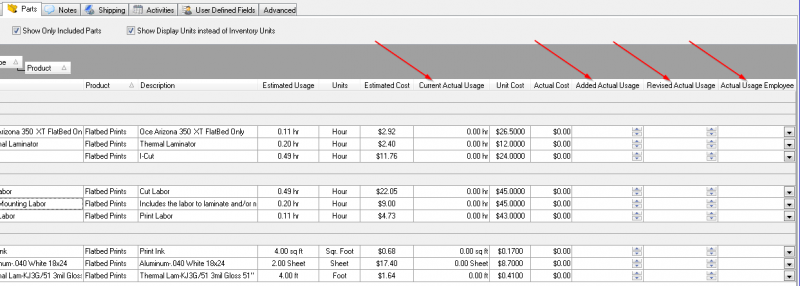
Current Actual Usage. This is the (renamed) Actual Usage column. It shows the amount of Actual Usage already posted on the order. This column is still not editable.
- Added Actual Usage. This column allows the user to add (or subtract) additional part usage for that row.
Notes:
- The standard display units for parts are used for entry and display.
- The display for this unit will use the display unit while displaying values (e.g., “15 min”) but only the number portion while editing (e.g., “15”).
- This column will remain blank (not zero) if it has no entry. It will only show non-zero values.
- Both positive and negative values are valid.
- Values can be entered for existing parts as well as newly added parts (those not yet saved).
- When a value is entered in the Added column, the Revised Actual Usage will automatically show the new total.
- This column is hidden by default. By default, it appears immediately following the Current Actual Usage column in the list.
- Revised Actual usage. This column allows the user to set a new total part usage for that row.
Notes:
- The standard display units for parts are used for entry and display.
- The display for this unit will use display units while displaying values (e.g., “15 min”) but only the number portion while editing (e.g., “15”).
- When a value is entered in this column, the adjustment (Revised - Current) is recorded in the Added Actual Usage column.
- If the user blanks this column out, the Added Actual Usage column will also be blanked out,
- This column will remain blank (not zero) if the Added Actual Usage row has no entry. It will only show a value when the new total would be changed.
- Both positive and negative values are valid.
- Values can be entered for existing parts as well as newly added parts (those not yet saved).
- This column is hidden by default. However, it will be automatically shown if the Added Actual Usage column is shown. By default, it appears immediately following the Added Actual Usage column in the list.
- Added Actual Usage Employee. This column is used to set the employee associated with the actual usage changes.
Notes:
- The column is a drop-down of valid production employees.
- The column will display blank if no value is filled in the Added Actual Usage column.
- When a value is entered in the Added Actual Usage or Revised Actual Usage column, the most recent employee selected in this column (for another row or order) is automatically set. This means that once an employee is selected, they will remain the default until a new employee is chosen. Upon running Control, the initial employee selected will be the logged in user.
- This value is required and may not be blanked out manually, except by removing the value from the Added Actual Usage column (which will automatically blank the display).
- This column is hidden by default. However, it will be automatically shown if either the Added Actual Usage or Revised Actual Usage columns are shown. By default, it appears after the Revised Actual Usage column.
Notes:
- Any time the order is being edited, the parts grid can be edited and actual usage can be posted.
- The tab & arrow keys also work to move down from one row to another for more rapid data entry.
Aggregated Part and Added Usage
Another new feature added to the parts grid is the ability to aggregate similar parts and add usage multiple instances of the same part at one time. More details can be found here.
New/Enhanced Grid Functionality
A few smaller changes in functionality will make the grid more functional in other areas. These include:
- Right-click option to clock onto labor part.
- Adding “Save Grid Columns and Layout” to the grid right-click.
- Add ability to Export parts grid.
- The ability to add a new part to the order on the order parts grid.
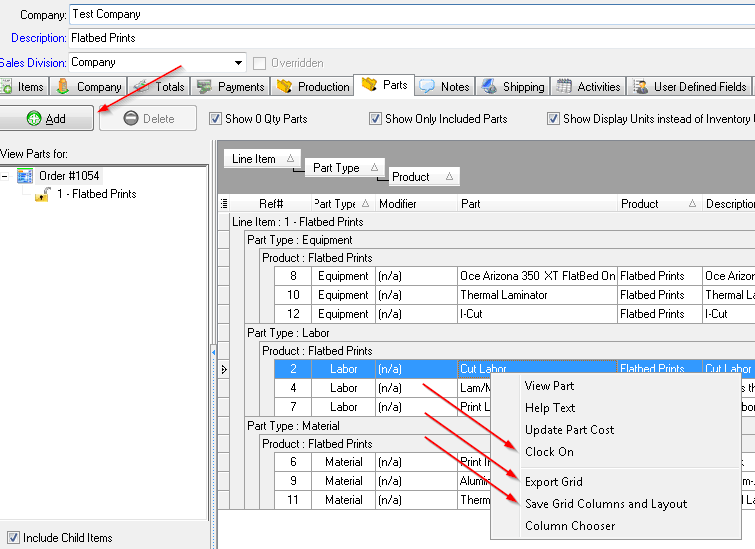
Each of these features is described in the paragraphs below.
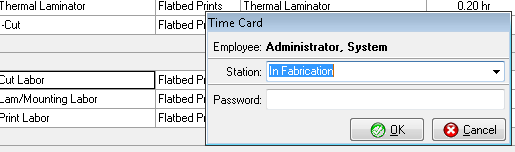
- When the user clicks on a labor part on the parts grid, the option to “Clock On” should appear. It will then create a new time card for the user for that particular part (automatically closing any already open time card). A confirmation dialog will appear that they are clocked in, but then automatically close if not clicked on within 2 seconds.
- An additional change will persist the grid grouping when the column chooser saves the grid configuration so that when the user opens a new order, the same parts grid grouping options are pre-configured. Also, the filtering options will be saved and restored.
- Most users do not realize that they need to re-open the column chooser to save changes they made in the grid. To make this more evident, the action “Save Grid Columns and Layout” has been added to the right-click menu for the grid above the “Column Chooser” action.
- The option to export the grid, which is already used in the Explorer, has also been added to the parts grid for Excel (and other formats).
- Finally, we enabled the user to add a new part on the order's part grid. Previously, this was only enabled on the item part grid. Moving this to the order's parts grid requires the user first identify the line item the new parts will be added with. To do this, a drop-down list of the order's line items to select from is added to the top of the “add part” frame. This defaults to the current line item part when adding parts from the line item grid, but must be manually set by the user when accessed from the order parts grid (unless there is only 1 line item, in which case it should be set then automatically).

Lock Avalara on Part Usage Posting
Previously, posting part usage triggered an update to the order which also triggered additional tax look ups with Avalara. Because of their volume, this can become very expensive with Avalara.
While posting part usage, if the order subtotal and all line item prices stay exactly the same, the assumption is that the taxes are the same and no additional Avalara lookup is enacted.
Line Item Parts Grid Changes
The line item implementation of the part grid changes are exactly the same as the order level parts grid changes. The only difference (of course) is that the grid is filtered to only show the line item. However, all additional new functionality is required.
Order Edit Actual Part Usage Action
To use the functionality described here the user would need to:
- Open the order.
- Edit the order.
- Click on the parts tab
- Make the usage changes
- Click Save.
In order to make this a more efficient process for some users, a new action has been added to all transactions, Adjust Usage. This action - exposed in the right-click for Orders, Service Tickets, and Estimates - will do the following steps:
- Place the order in Edit Mode. (See notes if the order is locked.)
- Open the Parts tab for the order in a modal dialog.
- Reveal the following columns even if they are not already in the column chooser to be displayed:
- Current Actual Usage
- Added Actual Usage
- Revised Actual Usage
- Actual Usage Employee
- Place the cursor in the Added Actual Usage column in the first row.
- Allow the user to post any changes.
- Upon clicking the OK button, save changes, remove the CHAPI lock on the order, and close.
Notes:
- A Cancel button on the modal form will cancel all changes, unlock the order, and then close. The caption for the modal window reads:
[Order|Estimate|Service Ticket] #XXXX - Adjust Actual Part Usage
- If the order is locked, the following dialog will be displayed:
[Order|Service Ticket|Estimate] #XXXX is currently locked by and can not be opened for changes. This screen is being opened in read-only mode.
- In this case, the screen will still open however no changes will be allowed and only an OK button will appear at the bottom.
Security Requirements
Only users who have the permission to post part usage cards will have the action Adjust Actual Part Usage visible or enabled in the menus.
No additional security restrictions are placed on the editing the information within an order.
Technical Details of the Part Usage Creation
When the order is saved, it must check if any part usage entries need to be created. All part usage entries should be bundled into the transaction associated with the order's save.
Notes:
- The treatment of all costs is identical to that in Post Part Usage except as noted below.
- Any time entry is assumed to be Straight time. There is no provision for Overtime or Shift Differential time except in the Post Part Usage dashboard.
- If Payroll or Advanced Job Costing is enabled, then the pay rate for the Actual Usage Employee is used as the hourly cost. Otherwise, the part's unit cost for that part is used. (This is the same as the dashboard currently, though the dashboard allows entry of non-straight time.)
See Also
- Backlinks include_pagepage_componentbacklinks