Table of Contents
Online Tax Options using Avalara AvaTax
To configure and enable Avalara within Control the following items are needed.
- You have purchased and been authorized the Avalara AvaTax Module for Cyrious Control from Cyrious.
- You have your Avalara AvaTax account information.
- You have administrator-level rights within Cyrious Control.
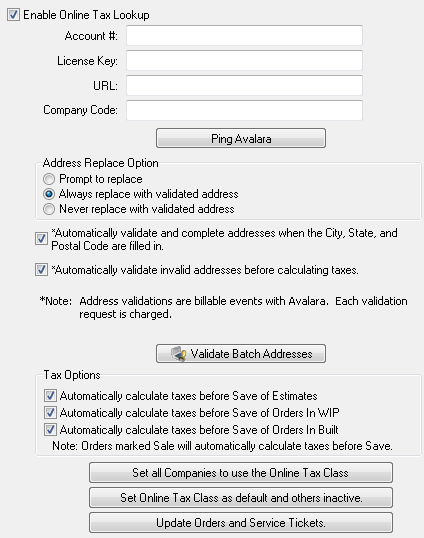
Step 1: Enabling the Online Tax Lookup
- Log into Control using an administrator-level user account.
- Click on Setup | Accounting Setup | online_tax_options.
- Click the Edit button on the right-side toolbar.
- Input your Account #, License Key, URL, and Company Code.
- Click the Save button on the right-side toolbar.
Step 2: Verifying Connectivity with Avalara AvaTax
- Click the Ping Avalara button.
- You should receive a message advising “Test successful.” If you receive any other message please contact Cyrious Technical Support for assistance.
Step 3: Configuring the online_tax_options
Address Replace Option
In order to properly calculate taxes a valid address must be specified. When you create companies in Control you have the option of letting the tax module automatically validate the addresses. This set of options determines how that validation is handled. The following options you determine whether or not to use the Avalara formatted address or your own.
- Prompt to replace
- Prompts the user to update the address with the address returned from Avalara.
- Always replace with validated address
- Automatically updates the address in Control with the address returned from Avalara without prompting the user.
- Never replace with validated address
- Leaves the address in Control intact after a verification is performed. There is no prompt to the user.
Option: Automatically validate and complete addresses when the city, state, and postal code are filled in.
During the entering of the address for a company, Control will immediately request an address verification once the city, state, and postal code fields have been entered.
Option: Automatically validate invalid addresses before calculating taxes.
It is recommended that this option always be enabled to ensure that the proper address is utilized when determining the tax which will be applied to the estimate/order.
Tax Options
This set of options determines when you want to automatically calculate taxes on estimates and orders. If you do not have a need to quote taxes to your customer until all work has been performed and the customer receives a final invoice for payment then it is recommended to disable all 3 of these options. Avalara charges based on how many billable events (calculations) per transaction. These options reduce the frequency that taxes are generated.
Note: Currently, I believe you get 10 calculations per transaction as a single billable event however you should check with Avalara to confirm your plan and the validity of this comment if you desire.
- Automatically calculate taxes before save of estimates
- When saving a new estimate or adjusting an existing estimate that uses the Online Tax class, Control will request a calculation on the taxes from Avalara.
- Automatically calculate taxes before save of orders in WIP
- When saving a new order or adjusting an order in WIP that uses the Online Tax class, Control will request a calculation on the taxes from Avalara.
- Automatically calculate taxes before save of orders in Built
- When marking an order Built or adjusting an order in Built that uses the Online Tax class, Control will request a calculation on the taxes from Avalara.
Step 4: Should I use any of the 4 buttons?
There are 4 additional buttons that we have not discussed. None of these buttons are required, however some are recommended to be used.
- Validate Batch Addresses
- Click this if you want Control to send every address entered into Control to Avalara to have it verified for accuracy. Please note that this does incur a fee with Avalara since you're sending them a bunch of requests. If you choose to not do this then a verification will need to be done when an actual estimate or order checks the taxes since a valid / recognized address is required for Avalara to calculate taxes. See batch_address_validation for more information.
- Set All Companies to use the Online Tax Class
- Click this if you want Control to change the existing Tax Class on all companies to Online Tax. If you do not do this step then Avalara will not calculate the taxes automatically on any future orders for companies. You'll manually have to set this on each order. This technically is optional but it's recommended that you click this button to avoid extra clicks and mistakes in the future.
- Set Online Tax Class as default and others inactive
- Click this if you want Control to disable all other tax classes. You can do this manually under Setup | Accounting Setup | Tax Classes. Only use when online tax lookup will be the only means of calculating taxes.
- Update Orders and Service Tickets

- Option: Override the current Tax Class for all open Orders and Service Tickets to prevent an edit from changing the tax class.
- You should click this option if you wish to retain the current tax class that is set on all open Orders and Service Tickets. This means that every open order will retain their current tax treatment using the existing non-Online tax classes, however future orders will use the tax class defined on the company.
- Option: Update all open Orders and Service Tickets that have Companies with Online Tax Class as their default tax class.
- You'll need to make a decision here, generally I recommend against this setting if you do not have several hundred open orders. If you click this button the system will update all orders to use the Online Tax Class. While this is good because it saves you time editing orders, it does have the downside of potentially making your financial tax reporting for the first month difficult.
- i.e. Let's say you have 100 orders in Sale prior to using Avalara, those 100 orders have already recorded sales tax. Depending on how often you report sales tax you may have already reported and paid those sales tax. If you update those existing orders in Sale to use Online Tax and then you adjust the order in any manner you are essentially telling Avalara to record sales tax in their system. Then, at the end of your reporting period when you print reports in Avalara those 100 orders will be listed along with the sales tax owed thus making it so that you pay the sales tax twice.
- The alternative solution is to manually edit each open Order and adjust the tax class to the proper setting. I recommend setting all WIP and Built orders to Online Tax and setting all Sale orders to use the existing tax class prior to enabling Online Tax. When you override the tax class on those Sale orders that will be excluded from any online lookup thus eliminating the possibility of you double-paying sales tax. Please note however, that at the end of your current month you should run a sales tax report and combine the figures from all tax classes except “Online Lookup” with your reports from Avalara to ensure that you report the proper sales & sales tax calculations to your tax regulatory authority.
Source
Contributor: Brandon R., Cyrious Software
Date: 1/16/2014
Version: Control 4.1+