Table of Contents
This feature gives the user the ability to add and remove toolbar buttons, and top-level menu items.
Concept
The Main Control Toolbar and Main Menu are mostly static collections of toolbar buttons and menu items. Some buttons and menus are removed based on modules or security, but most of them remain regardless of the user or their use of the system.
The purpose of this new feature is giving the user the ability to add and remove toolbar buttons and top-level menus. Thus, if any user chooses sets of specific buttons and menus, the user will only see those selected ones as the toolbar buttons and main menu items, however the user always has the ability to change her/his selected sets of toolbar buttons and menu items.
Cautions
If a user has not selected any toolbar buttons and menu items, the user will see whatever is selected by the administrator (if the user has the appropriate security rights and modules), and if the administrator has not chosen any, there are default toolbar buttons, and menu items which will be seen by the user. The user always has the ability to select her/his own sets of toolbar buttons and menu items.
Steps
To Customize Main Menu
- Click on the small eject icon on the main menu
mainmenu_customize.jpg_width295
- Click on an unchecked menu item. This causes the associated menu to appear.
- Click on a checked menu item. This causes the associated menu to disappear.
To Customize Toolbar Buttons
- Click on the small eject icon on the toolbar
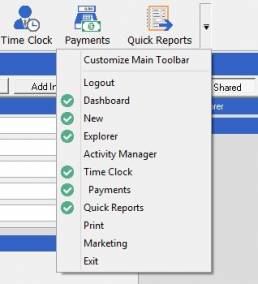
- Click on an unchecked toolbar button. This causes the associated button to appear.
- Click on a checked toolbar button. This causes the associated button to disappear.
Source
Contributor: Soha Khazaeli, Cyrious Software
Date: 12/30/2015
Version: Control 5.7
See Also
- Backlinks include_pagepage_componentbacklinks