Table of Contents
What's New In Control 5.5?
With the release of Control 5.5 there will be a handful of new major features added to the program, as well as a slew of various bugs fixed and other non-major features that have been tweaked since 5.1. This document is to give users a brief overview of some new capabilities of the program, and provide links to the detailed pages on each of these features.
__Major Features__
Document Management
Summary
Control now includes integrated document management. Folders for storing all those relevant files (artwork, permits, etc.) are automatically created for each order, estimate, and customer. Those files can be accessed by all employees from the documents tab inside the order, estimate, or customer.
Details
Control's Document Management (DM) incorporated full support for adding and deleting files, copy-and-paste, and even drag-and-drop from Windows File Explorer. Shared files are normally placed in the customer documents folder and order or estimate specific files are placed in those specific folders. Navigating to the customer's document management folder is simply a click away from within the order or estimate! Control uses a logical naming structure for all folders, allowing documents to be accessed directly via a network share without going through Control when needed.

User Advantages
- Every printing, sign, and graphics business has to manage documents.
- The Control DM system is intuitive, powerful, and easy to administer.
Customers this will Appeal To
- All customers, but especially:
- Those with repeat business - they have a greater requirement to manage past documents (artwork).
- Larger customers. The more players involved in an order, the greater the need for a system to manage artwork and other documents.
Spell Check
Summary
Integrated spell checking is now an integral part of Cyrious Control 5.5.
Details
All the advanced functions you expect in a premium spell checker, like custom user dictionaries, the ability to add and ignore words, and even those red wavy lines that appear as you type!

Domain Login
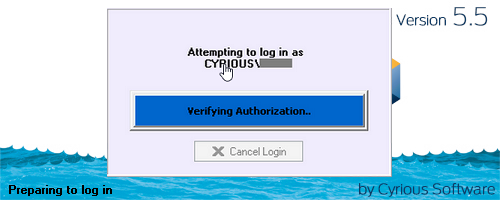
For companies running a Windows domain for centralized IT authentication and management, employees no longer need a separate login for Control. If the user is logged into their Windows account, Control will automatically log in as the appropriate user.
User Advantages
- Skip the second log in (for Control).
- Fewer passwords to remember / administer.
Customers this will Appeal To
- Mid-size and Large customers who typically run a Windows domain.
Automatically Distributed Part Usage
Summary
Many orders use the same materials in a number of products, and even within the same product. Control's new distributed part usage screen allows you to enter the material used for the whole order and it will automatically apply the materials (and costs) across all items based on the material estimates for those items.
Details
It is not uncommon for a given product or order to contain multiple instances of the same part used. For example, an electric box sign may use sheet aluminum for the top, sides, bottom and back. All of these may be represented as separate parts on the same product. Similarly, the labor applied for fabricating the aluminum may be included as separate parts. This separation is useful for the computation of costs, but can be cumbersome for production when they have to select between the different parts to apply labor and material usage.
To improve the interface for the production user, the Control parts grid has been enhanced to include options to summary view which aggregate similar parts into one logical part. Part usage may be applied to the aggregate part and the usage is automatically allocated between the composite parts.
Customers this will Appeal To
- Customers who track (or want to track) actual costs by order - this makes the applying of those costs easier and more natural.
- Customers with detailed bill-of-materials - they can apply materials to the whole order and let Control determine which lines to apply it to.
- Customers with orders with lots of line items - rather than apply material use multiple times for all the lines, they can now apply the material one time and let Control determine which lines to apply it to.
__Enhancements__
Visual Update
Summary
New icons have been added throughout the program and other color changes have been made within activity manager. The primary purpose of this is to improve readability, and to refresh the look of Control for long time users of the Control application.
Line Item Due & Proof Date Enhancements
Summary
Due & Proof date with times are now available for each line item. Previously only the due date was an available option.
Details
You now have the ability to right-click on any line item and change the line item due date or proof date without editing the order. This can be accomplished from any line item explorer or dashboard instrument. Although a simple change, the reduction in clicks has a significant impact on the overall flow and efficiency of managing due & proof dates of line items.
Estimate to Order Cost Transfer
Summary
Actual costs applied to estimates (such as for design) are now automatically transferred to orders when the estimate is converted.
Details
This behavior may be disabled if preferred. Accounting note: Estimate costs are immediately realized as expenses; whereas order costs are accrued in the Cost of WIP & Built account until the order is a Sale. Transferring the costs from the estimate will reverse the actual expenses on the estimate and result in those costs being moved to their accrual account on the order.
Employee Password Self-Reset
Summary
Tired of resetting lost passwords, or possibly contacting Cyrious for help with this? Control now permits users to reset their own password if they've forgotten it.
Details
An employee may reset their Control password using the email address associated with their employee record. An email containing a temporary password (valid until midnight of the current day) and instructions are sent from Cyrious' mail server. When a user logs into Control they can utilize a reset code to login and specify a new password for their user account.
Zip Code / Postal Code Lookup
Summary
Once enabled, you'll notice the postal code (zip code) is now before the city and state when entering an address. When you enter a postal code and tab out, the city and state/province and country are looked up from Cyrious' cloud servers and automatically filled in.
Details
Postal Code look up is currently supported for the following countries: US, Canada, and Australia. Postal Code Lookup requires an internet connection on port 80 (the same port used for web browsing).
Control Message Handling Rework
The messaging between Control and the SSLIP was enhanced to support businesses with a higher than typical volume to activity. These customers should see an increase in reliability and speed.
See Also
- Backlinks include_pagepage_componentbacklinks